


 Andy Boxall / Digital Trends
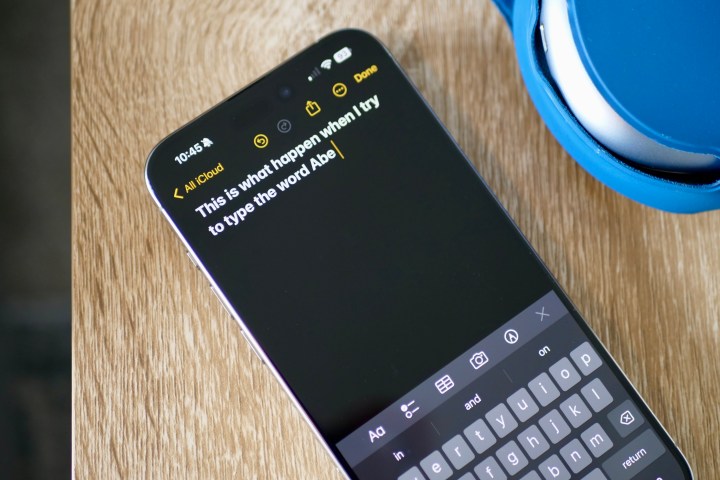
Abe, Ann, Anne, Anna, Ana, Ave, AB’s. These words are the bane of my life, as all too often my iPhone thinks I’m typing them instead of the word “and.” It happens shockingly often, to the point where I begin to think it’s doing it deliberately to troll me.
Contents
- It’s always the word ‘and’
- Surely I’m exaggerating?
- What can I do about Abe?
- Please, let AI come to my rescue
I’m an iOS keyboard fan, but it’s getting to the point where I’m going to have to make a big change unless Apple does something about it.
Recommended Videos
It’s always the word ‘and’
Andy Boxall / Digital Trends
I find swipe (or glide) typing the fastest way to type on a touchscreen … until it’s not. When the phone incorrectly guesses the word you were trying to type, it takes you out of the process as you erase and replace the word with the right one — assuming the predictive text has given you the option of that word, of course. Breaking your flow like this slows it all down, and it can get quite annoying.
Related
-
The iPhone 17 may get a display upgrade I’ve waited years for
-
I tried Belkin’s ridiculous new iPhone accessory — and I love it
-
I said I wouldn’t do this to my iPhone, but did it anyway
Now, imagine the keyboard gets one particular word wrong a lot of the time, and it’s a commonly used one that contains only three letters. That’s the situation I have with the word “and” on my iPhone. It’s not a new thing either; it has happened for as long as I can remember, so I can’t specifically blame a recent iOS update for this word blindness. I use the standard iOS keyboard, which is excellent at all other times.
Although I gave a few examples of the words my iPhone thinks I’m trying to type instead of “and,” most of the time it’s absolutely convinced I want to type Abe. I can categorically state that I have never intentionally typed Abe into my iPhone. I don’t know anyone called Abe, so the name isn’t in my contacts, and I don’t tap out messages starting “Hey Abe” on a daily basis or anything that would prompt my phone to think I was always telling Abe something.
Then, there’s the context of these sentences. As an example, rarely would I want to type “I’m going to buy potatoes Abe…” but I may type “I’m going to buy potatoes and a steak.” If this was a real message swiped into my iPhone, guess which sentence my iPhone would think I was trying to type? Yep, it will want to make very sure Abe knows I’m off to grab some potatoes.
Surely I’m exaggerating?
Apple’s iOS keyboard Andy Boxall / Digital Trends
Just how prevalent is my iPhone’s refusal to print the word “and”? Perhaps I’m exaggerating about the problem slightly, but it happens often enough that I notice it and have to correct it. So, what’s causing it?
It’s an issue that really only affects me when I swipe type on my phone. If I tap out the letters, it doesn’t happen. But this is slower, which is why I tend to favor swipe typing. Abegate is not specific to one app either, so it’s not that, leaving the iPhone’s standard keyboard as the only logical culprit in all this.
Well, possibly the only logical culprit. There’s a chance — a vague one — that my clumsy swiping may also be to blame here, and in my haste, I’m giving the iPhone enough of a hint that I want to type Abe, Ann, or Ave, and not. A classic case of, to dig up an old IT support acronym, PEBKAC — problem exists between keyboard and chair.
If I make a conscious effort to deliberately swipe over the letters A, N, and D, then accuracy does improve, but muscle memory means it doesn’t always last, seeing good old Abe (and sometimes Ann) return to bother me. In all likelihood, the issue is a combination of my swiping and the keyboard’s predictive text system.
What can I do about Abe?
Gboard Andy Boxall / Digital Trends
I understand this is a very specific problem, but I wonder how many other people find their iPhones also have selective word blindness. Someone else may not have a problem with the word “and,” but instead, the keyboard always manages to confuse “it” with “or,” “out,” or “our.” Regardless of which word regularly confuses the software, the level of annoyance will be the same.
The bigger problem is that this isn’t supposed to happen. Apple made big claims about its updated language model introduced in iOS 17, which better understands grammar when typing and will let you freely type the word previously altered to “duck.” Well, all I want to do is type “and,” and not ducking Abe.
What about using a different keyboard? I like Apple’s keyboard and dislike alternatives like Microsoft’s hateful SwiftKey. Plus, the way you switch between keyboards in iOS makes it too easy to accidentally change them, therefore becoming another irritation I’d rather avoid.
However, when I swipe type on an Android phone using Gboard, it never suggests Abe. I’ve tried using Gboard on my iPhone, but the iOS version of Gboard doesn’t know me, and training it from the start to understand the way I type is even more time-consuming than changing Abe to and.
Please, let AI come to my rescue
Andy Boxall / Digital Trends
What do I want to be done about this most serious of problems? AI is the big new thing in mobile, and most new phones boast a range of AI software features. For iOS 18, I don’t want Apple to introduce AI voice translation or AI transcription features I only use once in a while. I want it to put all its AI power into the keyboard, so in the future, it will look at a sentence I’ve typed and think, “Hmm, I doubt he’s going for the word Abe here; I bet he meant to swipe ‘and,’ but is a bit clumsy. Bless, I’ll fix it for him.”
Hopefully, that’s not too much to ask, and I’ll never again have to warn someone that at some point during our typed conversations, it may look like I call them Abe or Anne. But I’m not — it’s just my phone.