

- Phishers are targeting Apple users in a new scam to steal Apple Accounts
- The scam harnesses genuine Apple Support emails to fool victims
- Always verify by calling Apple and never hand out authentication codes
Would you trust an unsolicited caller who claimed to be from Apple if their call lined up with genuine alerts from Apple’s own website? That creates a sense of trust, and it’s exactly that feeling of authenticity that scammers are exploiting in an active campaign that’s targeting Apple users and attempting to steal their account details.
For Apple user Eric Moret, that risk was all too real. As detailed in a Medium blog post, Moret received a text message out of the blue that contained a two-factor authentication (2FA) sign-in code, even though he was not attempting to sign in to any of his accounts. One minute later, he received an automated call from Apple that read aloud a 2FA code. Someone was clearly trying to break in.
Shortly afterwards, Moret got a call from an Atlanta number. The caller said they were from Apple Support, explained that Moret’s account was under attack, and said another representative would call him soon. That happened within ten minutes, initiating a “25-minute con” where the caller walked Moret through the process of resetting his iCloud password.
Here’s the clever part: the scam caller created a genuine Apple Support ticket for Moret and had him verify that it was from a real Apple email address while on the line. The caller was calm and professional, and everything reassured Moret that the process was above board.
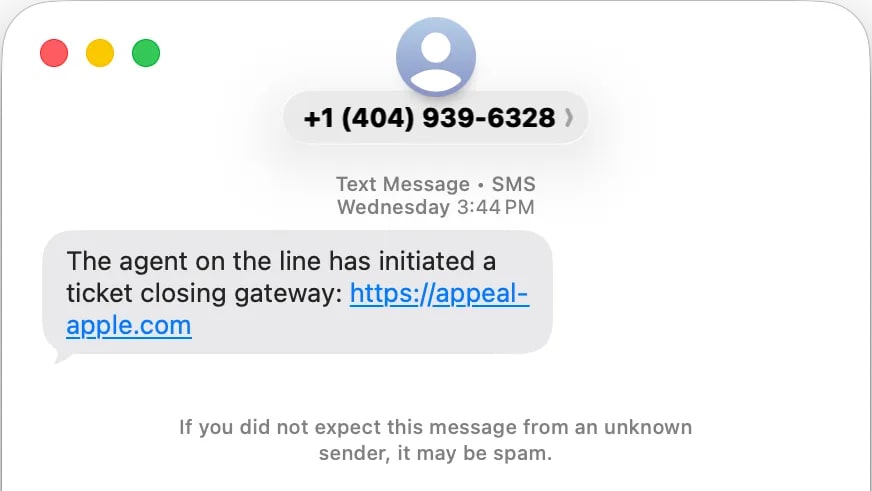
Moret was asked to reset his iCloud password and the caller never asked him to share it. Yet the next step was decisive: he was told he’d soon get a text “with a link to close your case.”
This text arrived and contained a link to a scam website: appeal-apple.com. That website said the process of securing Moret’s account was in progress and all he needed to do was enter a code to close the case. At that moment, he got a six-digit verification code sent to him via text, which he typed into the website.
That was the bait and switch. Instead of closing the case, the number Moret received was actually a 2FA code used to gain access to his account. Seconds after he entered it, he got an email that, he says, “made my blood run cold.” The email in question told him that his account was used to sign in on a Mac mini, yet he didn’t own any such device. It was clear that the scammers had gained access to his account, and with it his “entire digital life,” including files, photos, emails and more.
Trying to placate him, the scam caller told Moret that this was all “expected as part of the security process,” but Moret wasn’t convinced. Thinking quickly, he reset his iCloud password a second time, after which the Mac mini disappeared from his account and the spoof website began redirecting to Google. He had escaped disaster, but barely.
How to stay safe from attacks like this

The attack worked because the scammers were calm throughout and did not rush or pressurize Moret, which might have raised his suspicions.
But the real kicker was the authentic Apple Support email, which exploited a flaw in Apple’s systems: anyone can create an Apple Support ticket for anyone else, without verification. That means the attackers could start a case using Moret’s email address and have the Apple Support email sent there, lending weight to their plot.
Still, there are ways you can protect yourself from attacks like this. The most straightforward is to hang up if you receive an unexpected call from someone claiming to be working for Apple, then call Apple directly to verify if you really are at risk.
Beyond that, be careful with 2FA codes and never hand them out to anyone, even if they claim to be from Apple. Never give these codes out over the phone or share “confirmation codes” with another person. And always check a website is a genuine Apple domain, not one that simply uses the company’s name amid other URL elements, as the phishers here did.
And if you really want to stay safe and secure, use a hardware security key. These require you to actually physically connect the key to your computer in order to verify your identity – something a phisher will never be able to do.
Follow TechRadar on Google News and add us as a preferred source to get our expert news, reviews, and opinion in your feeds. Make sure to click the Follow button!
And of course you can also follow TechRadar on TikTok for news, reviews, unboxings in video form, and get regular updates from us on WhatsApp too.
