
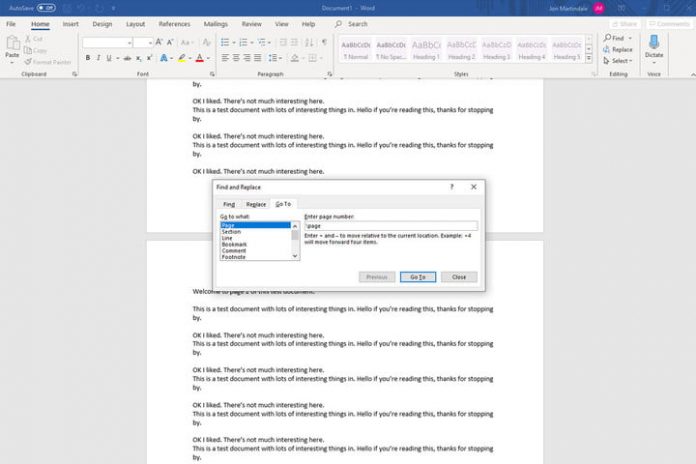

There are a number of great alternatives, but Microsoft’s Word is still one of the best and most popular text editors around. If you’re a fan or a new user though, knowing how to delete a page in Word can save you a lot of time and hassle. Whether you want to strip away a blank page at the end of a document quickly, or need to remove a page of unneeded content in the middle, here’s how to do it.
Want to give Word or another Office application a try? Here’s how to get Microsoft Office for free.
Step 1: Select the page you want to delete
The first step in deleting a page is making sure it’s selected. The last thing you want to do is delete the wrong one. Either scroll to the page, or use the Go To function (Ctrl + G. Or CMD + G if you’re on a Mac).
When you’ve found the page, click or tap anywhere on it to select it.
Step 2: Select the whole page
It might sound like you’ve already done this step, but this is so that Word knows that you want to delete the whole page, not just some of the content on it. Open the Go To function (Ctrl + G. Or CMD + G if you’re on a Mac) and type page in the Enter page number box. Then select Go To, followed by Close.
Step 3: Delete the page
Microsoft Word doesn’t have a dedicated page deletion tool, but now that we’ve selected the whole page we can delete it very easily. Double-check that you’ve selected the entirety of the page you want to delete and then press the Delete key.
How to delete a blank page in Word
Most text editors, Word included, have a habit of creating blank pages at the end of your document for seemingly no reason. Deleting those before you fire it off to your boss (here’s how to recall it if you didn’t) or the printer is usually a good idea. To make the process as fast as possible, there are a couple of quick methods you can use.
Step 1: To find the blank page(s), we want to open up the Navigation Pane. You can do so by selecting View from the top menu, and then making sure that the Navigation Pane box is ticked. That should open up a new column on the left-hand side showing all the pages in your document. If it doesn’t, make sure to select the Pages tab in it.
Step 2: Scroll through the list to find the blank page(s) you want to delete. Pick one and double click or tap it to jump straight to it.
Step 3: Press Ctrl + Shift + 8 (or if you’re on a Mac, CMD + 8) to show the paragraph markers that created the blank page in the first place.
Step 4: Click and drag to select all the paragraph marks and press the Delete key to remove them and the blank page. Alternatively, if you only have a few paragraph marks and want to move them onto the last page instead, you can select them all and change their font size by going back to the Home tab in the top bar, and typing “1” into the font size box, then pressing Enter.